SparrowGenie: Smart Mapping Experience
From AI-only failure to human-AI partnership: building intelligent manual tools and diagnostic systems

The Problem: AI-Only Mapping Wasn't Enough
We initially launched with AI-powered auto-mapping, believing smart algorithms could handle the chaos of enterprise RFP formats. Users were excited about the promise of automated document processing, but reality hit hard.
When AI Falls Short
"The AI would confidently map page numbers as questions, or completely miss entire sections of requirements. When it failed, I had no way to fix it myself—just a broken document and a support ticket."
Senior Proposal Manager
The AI-Only Reality Check
42% failure rate on complex Excel-based RFPs
No user control when AI made wrong decisions
No visibility into why mapping failed
Support ticket spike every time a new document format appeared
The design challenge evolved:
How do we create a hybrid system where AI handles the bulk work, but users have intelligent manual tools and clear diagnostic feedback when things go wrong?
Design Evolution: From AI-Only to Human-AI Partnership
Instead of abandoning AI or forcing users to go fully manual, went ahead with a hybrid approach: let AI do the heavy lifting, but give users powerful manual tools and clear diagnostics when the AI inevitably encounters something it can't handle.
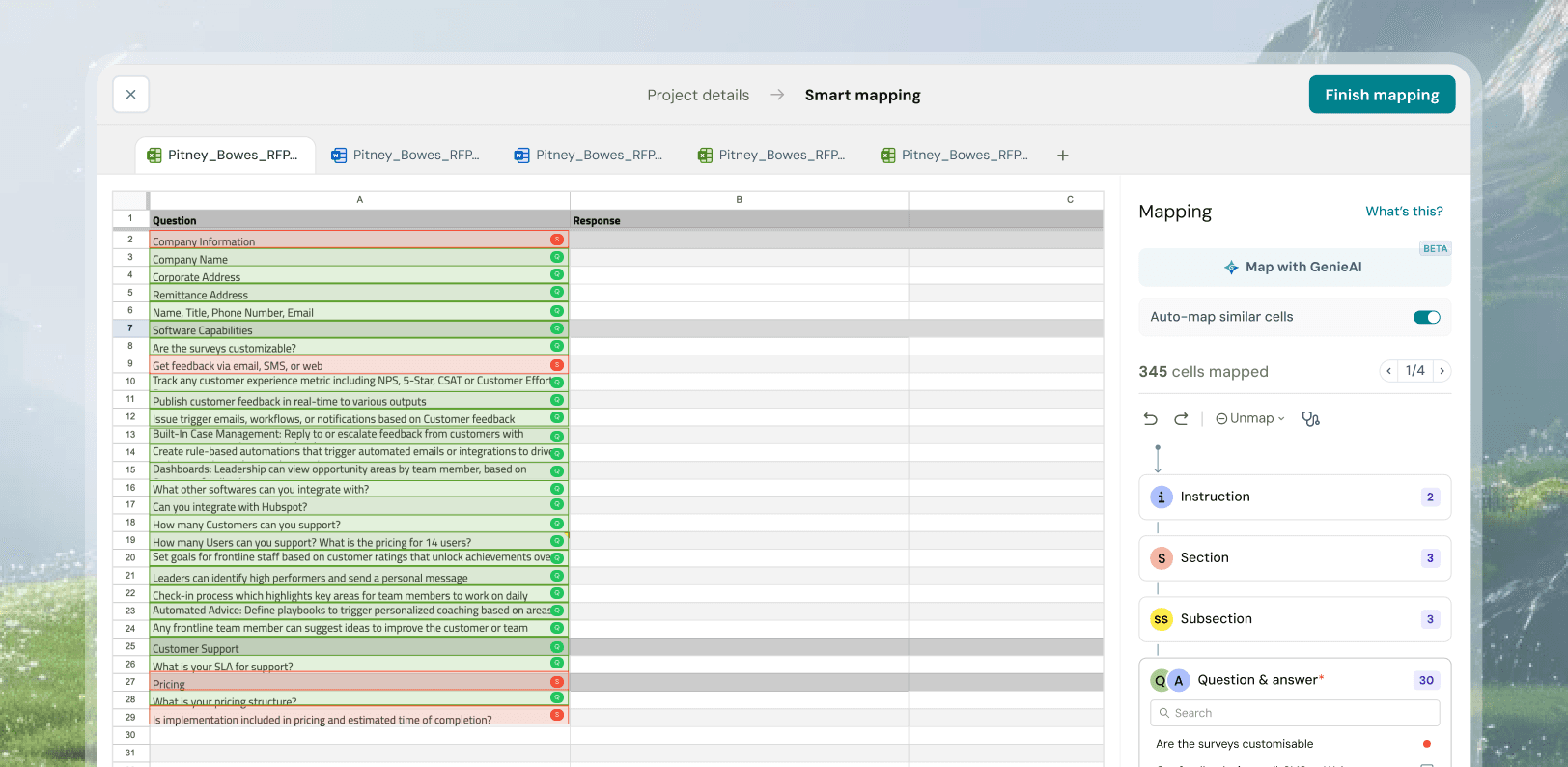
Map with GenieAI
Users trigger AI mapping on demand. The system analyzes structure and suggests mappings with clear color-coded classifications.
Auto Map Similar Cells
Detects formatting patterns to bulk-map similar cells in a few clicks, with real-time progress feedback.
Searching and filtering
Right panel enables search, filtering by type, and manual overrides to review and refine AI decisions.
Key Design Decisions: Building AI Escape Hatches
Instead of abandoning AI or forcing users to go fully manual, I designed a hybrid approach: let AI do the heavy lifting, but give users powerful manual tools and clear diagnostics when the AI inevitably encounters something it can't handle.
Transparent AI Confidence Display
AI was confidently misclassifying content with no visibility into its decisions, leaving users unable to trust or verify outputs. To address this, we made AI actions explicit with “Map with GenieAI”.
This shifted AI from a black box to a transparent system users could understand and trust.
Smart Manual Mapping as Primary Feature
Manual mapping wasn’t a fallback — it was often faster and more accurate than AI for complex documents.
Instead of forcing automation, we designed for speed and control with “Auto map similar cells,” enabling users to bulk-map patterns across spreadsheets in just a few clicks.
This reduced mapping time from hours to minutes, with manual workflows outperforming AI in many real scenarios.
Diagnosis Panel: Making Failures Fixable
When AI failed, users were left with broken outputs and no clarity on what went wrong, often defaulting to “the AI doesn’t work.”
To address this, introduced a contextual diagnosis panel that surfaces specific issues in real time, using clear visual indicators and one-click fixes to guide users toward resolution.
This transformed failure from a dead-end into a guided experience, shifting users from feeling helpless to informed and in control.
Design Process: Learning from AI Failures
Instead of abandoning AI or forcing users to go fully manual, I designed a hybrid approach: let AI do the heavy lifting, but give users powerful manual tools and clear diagnostics when the AI inevitably encounters something it can't handle.
Phase 1: AI-Only Launch (Failed)
Initial release with pure AI automation. Users loved it when it worked, but 42% failure rate on complex documents created frustration. Key insight: users preferred reliable manual tools over unreliable automation.
Phase 2: Manual Tools Development
Built sophisticated manual mapping tools based on user behavior observation. The Excel pattern recognition feature emerged from watching users manually identify similar cells. Made manual faster than AI for complex documents.
Phase 3: Diagnosis System
Added contextual diagnosis panel after realizing users needed to understand system behavior, not just use it. The diagnosis panel became as important as the mapping tools themselves.
Results: From Failure to User Success
Reduced number of support tickets
Smart Mapping Adoption : 72% of the power users
User satisfaction score: 3.1 → 4.6 (out of 5)
Key Design Learnings
AI Failures Are Design Opportunities
The initial AI failure taught us that users need control and understanding, not just automation. Building powerful manual tools as "escape hatches" created a more reliable overall system.
Smart Manual > Dumb Automation
Intelligent manual tools (pattern recognition, visual bulk operations) often outperform unreliable automation. Users preferred fast, controllable manual tools over slow, unpredictable AI.
Diagnosis Builds Trust Through Understanding
The diagnosis panel transformed user relationships with system failures. When users understand what went wrong and how to fix it, they become more confident and self-sufficient.